
The Smartest Lens
Configurator
for WooCommerce
LensKit Pro adds a beautiful, guided 8-step lens wizard to any WooCommerce optical store — prescription engine, live tint preview, real-time pricing, and deep order integration. No code required.
Every Screen, Crafted
for Optical Stores
From the admin dashboard to the customer-facing wizard — everything is built with clarity and conversion in mind.
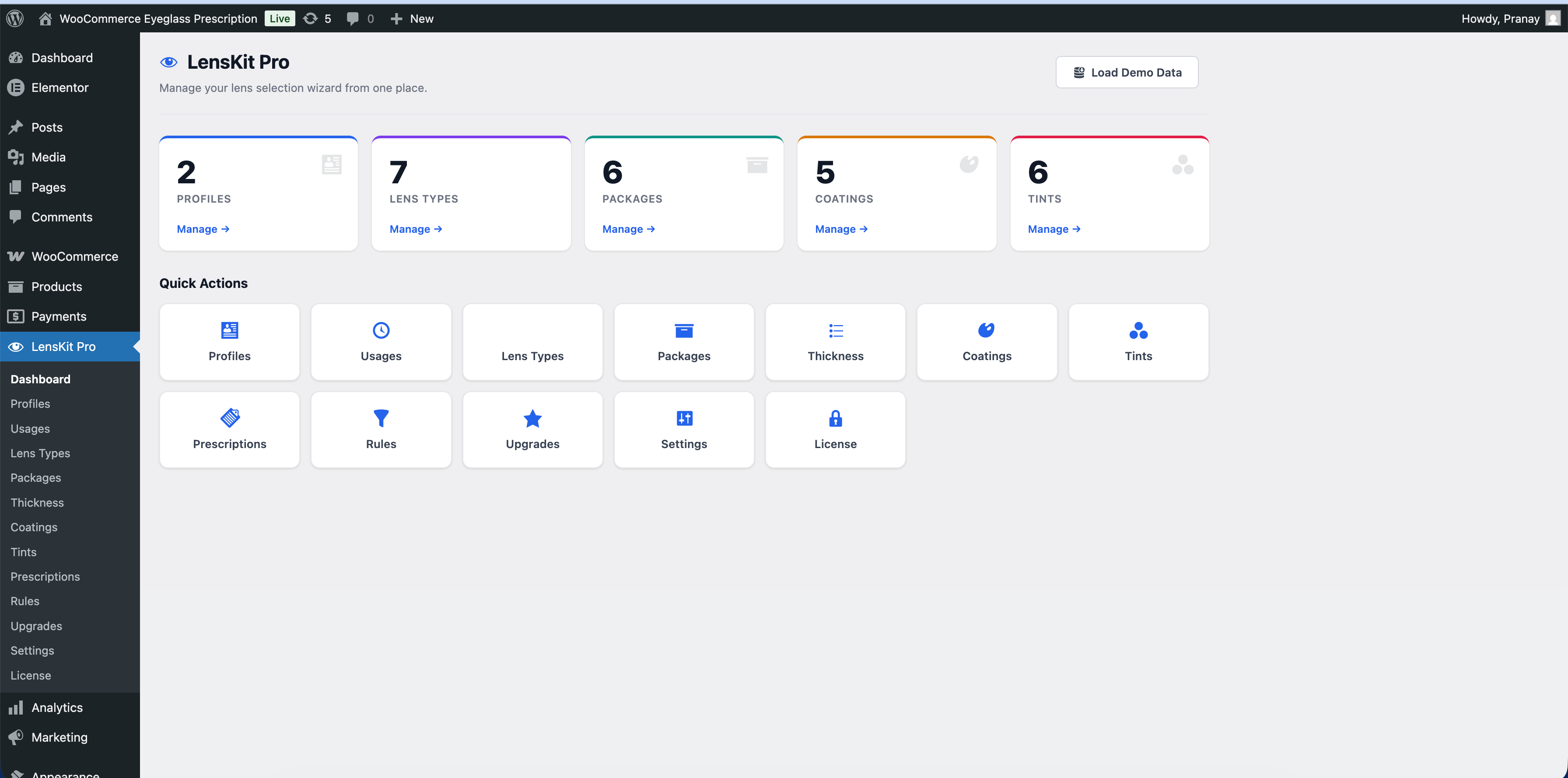
Powerful Admin Dashboard
Get a bird's-eye view of your entire lens catalog. Quick-action cards let you jump straight to Profiles, Usages, Lens Types, Packages, Coatings, Tints, and more — all from one screen.
- Stats cards for every module
- Quick-action navigation grid
- 1-click demo data to get started fast
- License management built-in
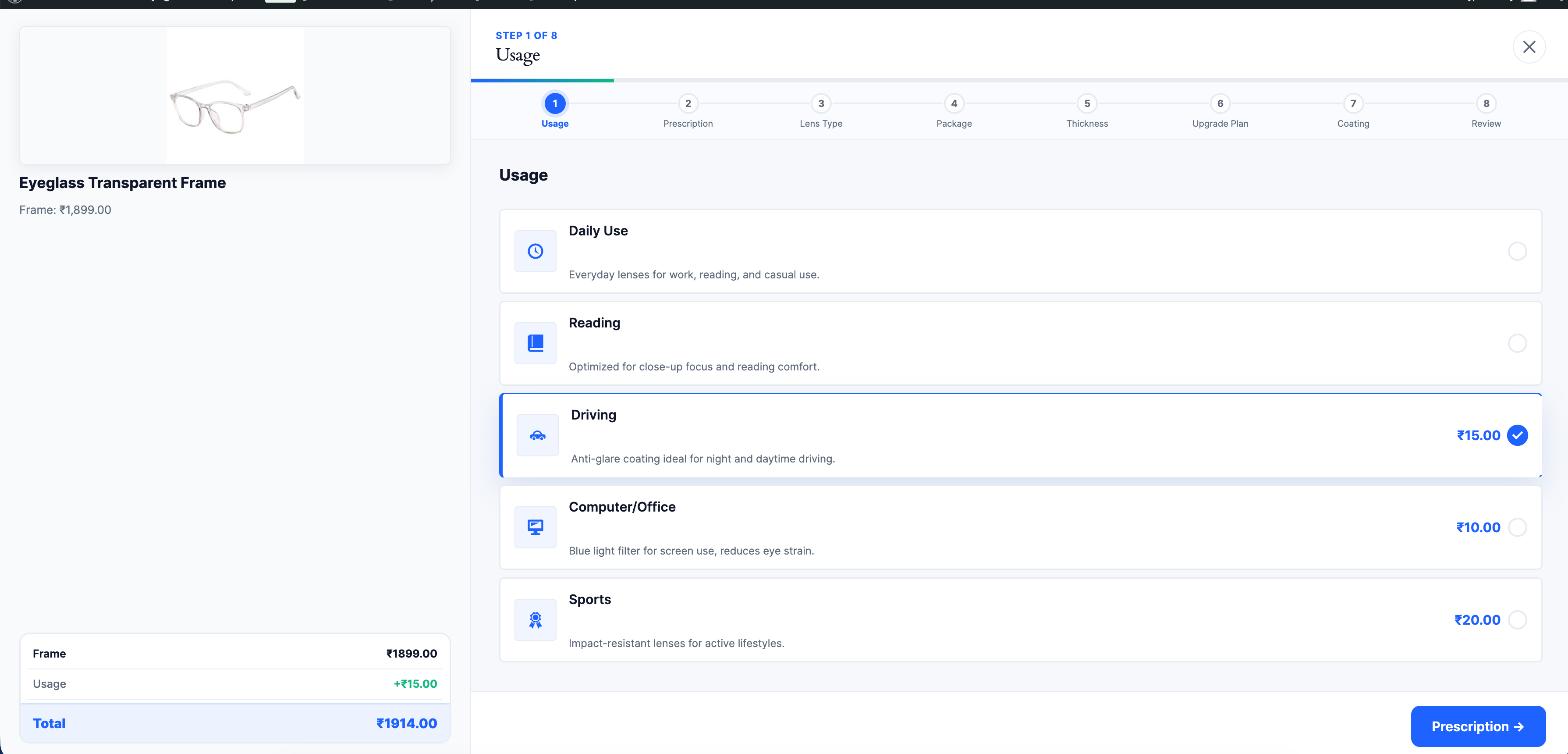
Seamless Customer Wizard
A step-by-step guided wizard overlays the product page. Customers select their usage, enter their prescription, choose lens type, package, thickness, coatings and upgrades — with the running total updating live at every step.
- Modal, Inline, or Fullpage display modes
- Up to 8 configurable steps per profile
- Live price breakdown at every step
- Mobile-first, fully responsive
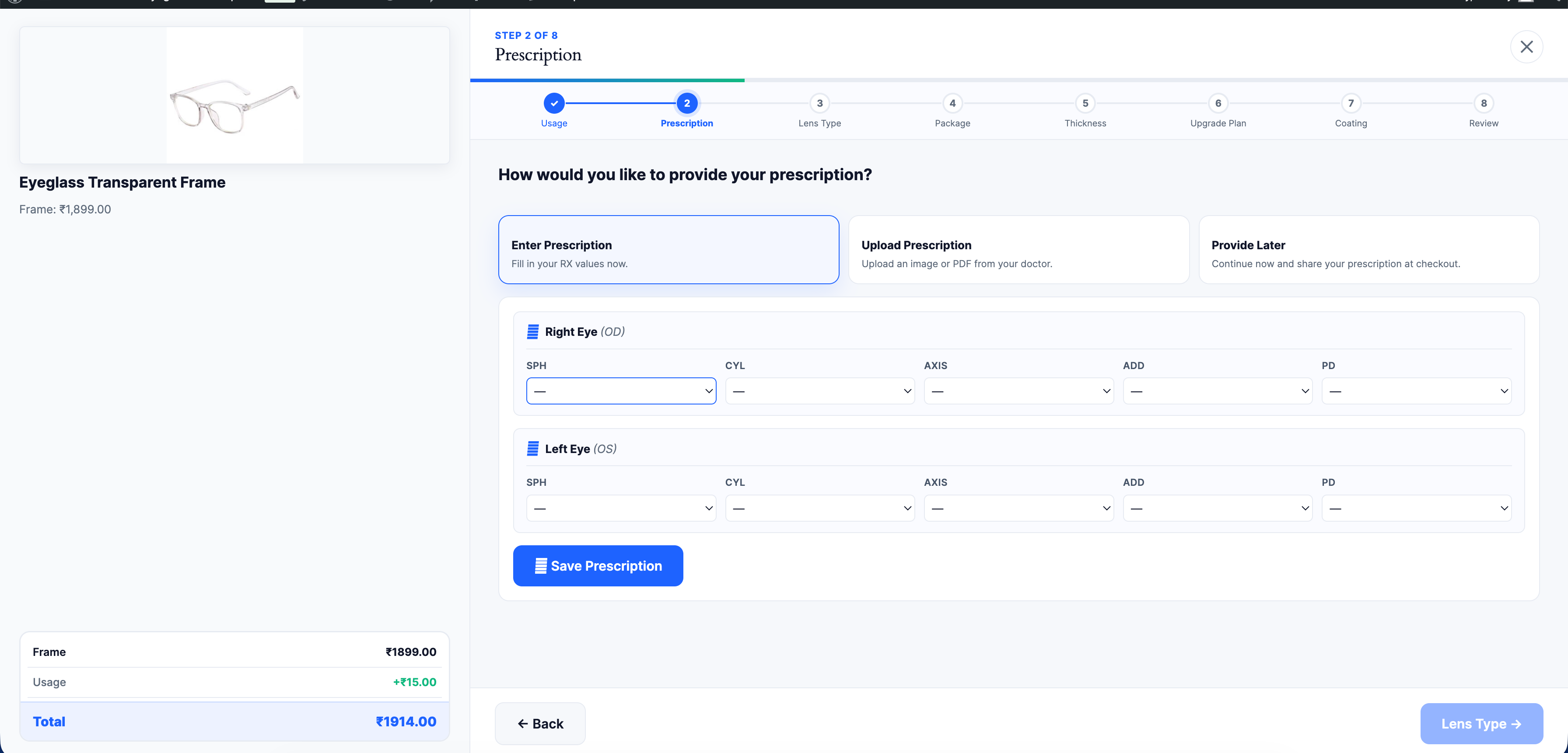
Full Prescription Engine
Customers can enter their RX values directly, upload a prescription image or PDF, or choose to provide it later at checkout. The rules engine automatically recommends lens types and packages based on the entered values.
- SPH, CYL, AXIS, ADD & PD fields
- Configurable value ranges per store
- Upload prescription (JPG, PNG, PDF)
- Smart auto-recommendation rules engine
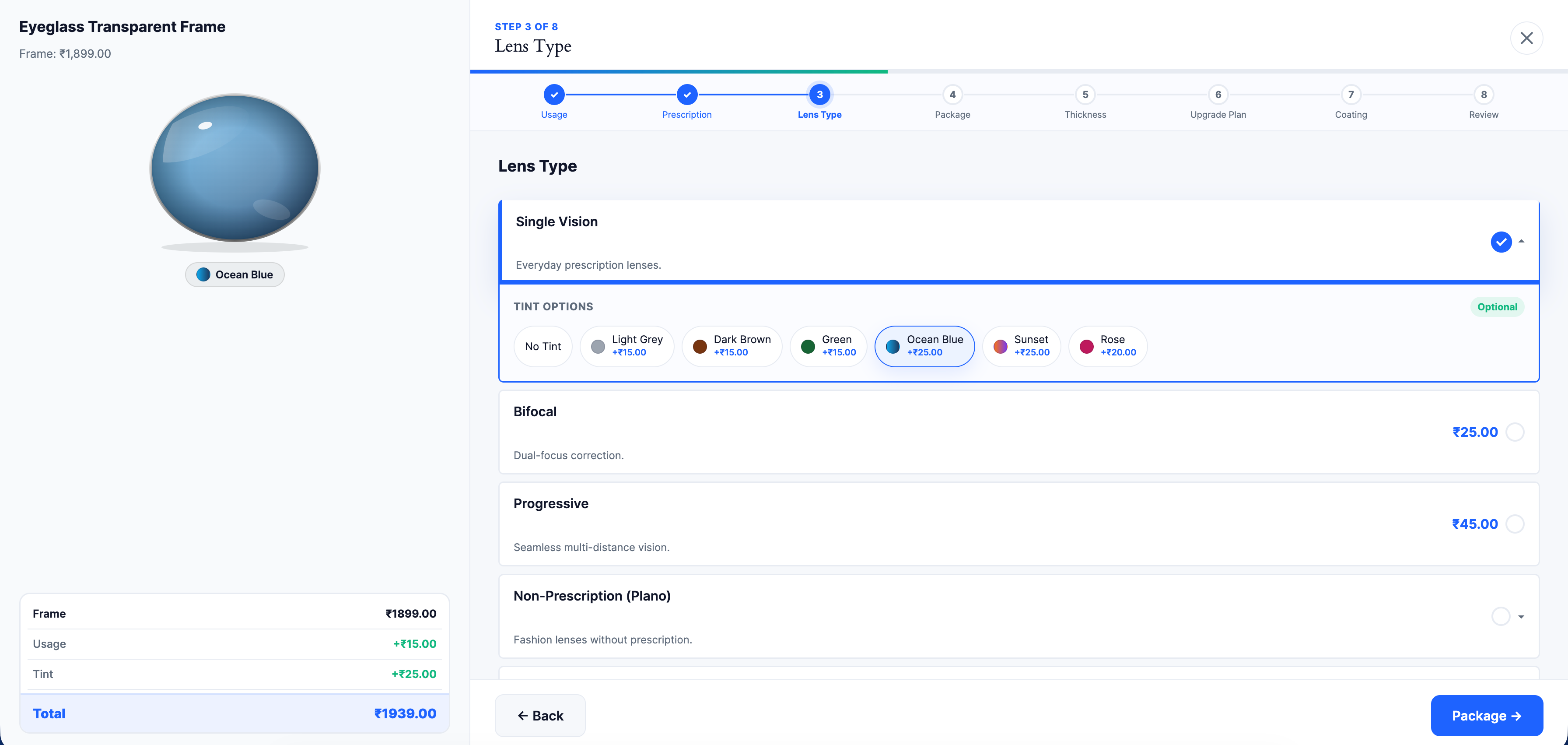
Live Tint Preview
As customers browse tint options, an animated SVG lens updates in real time — showing exactly how the lens will look. Supports solid colors and gradient tints. Manage solid and gradient tints from the admin with custom prices per tint.
- Animated SVG lens preview
- Solid & gradient tint support
- Per-tint pricing
- AR, UV400, blue-light & photochromic coatings
Deep WooCommerce Integration
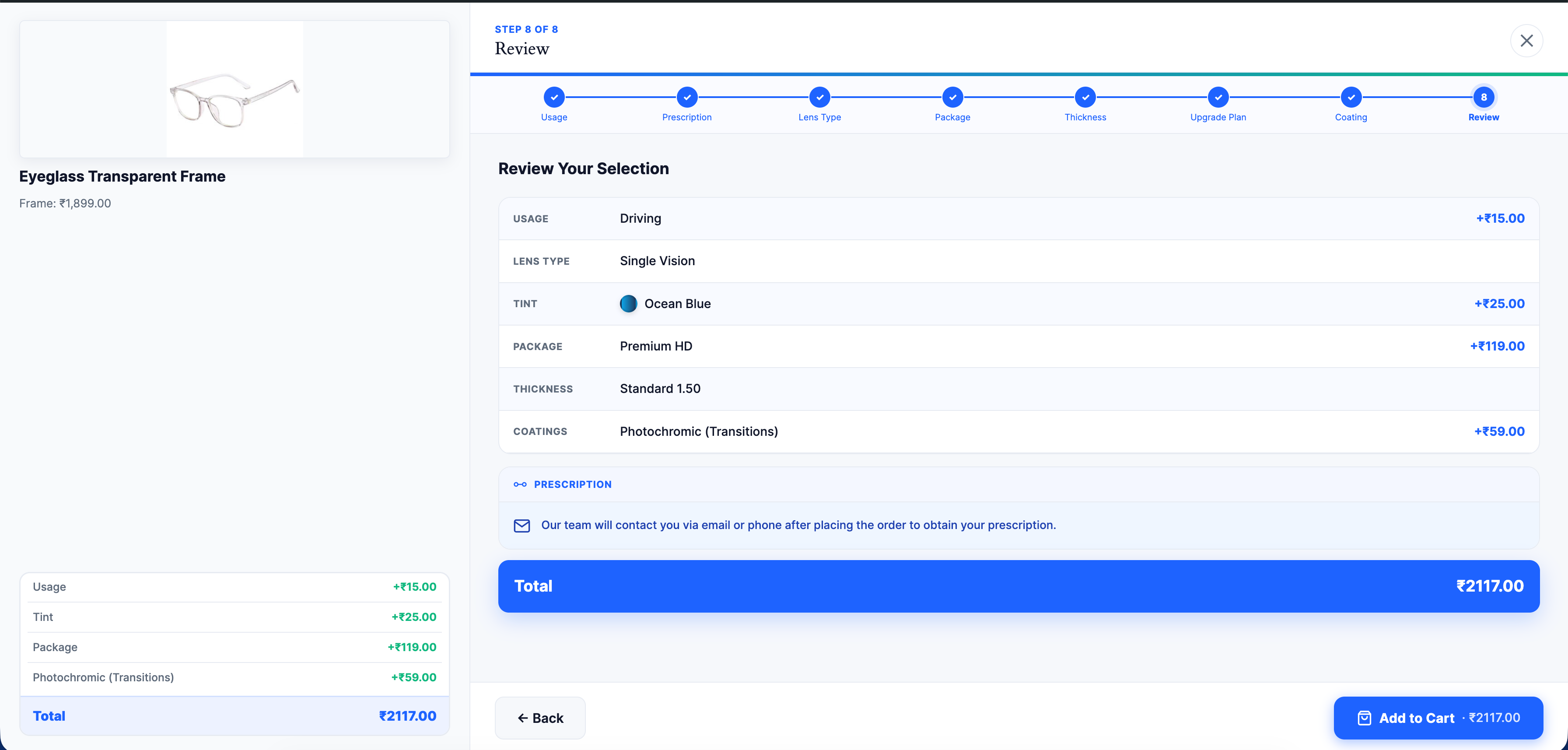
The final Review step shows a complete summary of every selection with the total price. On "Add to Cart", all lens choices are attached to the cart item and flow through to checkout, order emails, and the admin order view — exactly like native WooCommerce.
- Full selection summary before checkout
- Lens data attached to cart & order line items
- Visible in cart, checkout, emails & admin
- Variable product & attribute support
Built for Serious Optical Stores
Every feature your WooCommerce eyewear store needs — out of the box, no extensions required.
Multi-Step Guided Wizard
Fullscreen overlay guides customers through up to 8 configurable steps. Each step is optional, reorderable, and profile-specific.
Live Tint Preview
Animated SVG lens preview updates instantly as customers select solid or gradient tints — boosting confidence and reducing returns.
Prescription Engine
Full SPH, CYL, AXIS, ADD & PD entry with configurable value ranges. Smart rules engine auto-recommends packages and lens types.
Real-Time Pricing
Every selection updates the running total live. The customer always knows exactly what they're paying — no surprises at checkout.
Deep WooCommerce Integration
Lens selections attach to cart items and flow through checkout, order emails, and admin order view — exactly like native line items.
Unlimited Lens Profiles
Create separate profiles for Eyeglass, Sunglass, or Both. Assign profiles to specific products or entire categories — full control.
Three Display Modes
Choose Modal Overlay, Inline embed, or Fullpage wizard. Switch modes from Settings without touching a line of code.
Drag-to-Reorder Step Builder
Reorder wizard steps via drag-and-drop. Enable or disable individual steps per profile. Mark steps as required or optional.
REST API — 15+ Endpoints
Every wizard interaction is powered by versioned REST endpoints protected by license and nonce verification. Headless-ready.
One-Click Demo Data
Load a complete set of demo profiles, lens types, packages, tints, coatings, thickness options, and prescriptions in one click.
Sunglass Mode
Specialized flow for sunglasses including Polarized and Mirror lens types, sunglass-specific packages, and optional prescription.
Variable Product Support
Works seamlessly with WooCommerce variable products — captures the selected variation and attributes alongside lens choices.
Up to 8 Steps — Add, Remove or Reorder
The wizard supports up to 8 steps out of the box, but you're in full control. Enable only the steps you need, reorder them via drag-and-drop, and mark each one as required or optional — per lens profile.
Usage
Daily use, reading, driving, computer/office, or sports — optional add-on pricing per usage type.
Prescription
Enter RX values, upload an image/PDF, or provide later at checkout. Rules engine recommends lenses automatically.
Lens Type
Single Vision, Bifocal, Progressive, Non-Prescription (Plano), or Browse Sunglasses — with live tint preview inline.
Package
Standard, Premium HD, Ultra Thin — tiered packages with per-package pricing and feature lists.
Thickness
Lens index options from 1.50 through 1.67 — each with a name, description, and price delta.
Coatings
Anti-Reflective, UV400, Blue Light Filter, Photochromic (Transitions) — individually priced add-ons.
Upgrades
Warranty Plus, Express Delivery, Clip-On Sunglasses — upsell add-ons your customers can skip or select.
Review & Add to Cart
A full summary of every selection with the final total — then one tap to add everything to the WooCommerce cart.
Simple, One-Time Pricing
No subscriptions. Pay once. All plans include 1 year of free updates and full feature access from day one.
Everything you need to launch LensKit Pro on your WooCommerce store
- 1 WordPress site
- All features included
- 1 year of free updates
- 6 months email support
- 1-click demo data
- Full REST API access
- Up to 8 configurable wizard steps
Need the plugin modified, extended, or white-labelled for your store or clients?
- Custom feature development
- Multi-site / agency licensing
- White-label & rebrand option
- Custom integrations & API work
- Dedicated support engineer
- Priority onboarding & setup call
- SLA & long-term maintenance
All prices in USD. License is per root domain. Need to pay in INR or have questions? Get in touch.
Common Questions
Does LensKit Pro work with any WooCommerce theme?
Yes. LensKit Pro integrates at the WooCommerce product page level and works alongside any WordPress theme — Storefront, Astra, Flatsome, Hello Elementor, or custom themes. The wizard renders in a self-contained overlay that doesn't depend on your theme's CSS.
Can I try before I buy?
Yes — every license includes a 1-click demo data loader that seeds a complete working setup in seconds. You can also contact us to request a sandbox demo on our test store before purchasing.
What happens after I purchase?
You'll receive a download link and your license key by email immediately. Install the plugin on your WordPress site, enter your key in LensKit Pro → License, then use the demo data loader or configure your profiles manually. We're available via email if you need help with setup.
Are updates free? Will I be charged again?
All plans include 1 year of free updates from your purchase date — including new features, WooCommerce compatibility updates, and security patches. After the first year, you can renew at a discounted rate to keep receiving updates.
Can I customise the wizard's appearance to match my brand?
Yes. From LensKit Pro → Settings you can set your primary and secondary brand colours, customise the "Select Lenses" button text and HTML, and inject custom CSS. For deeper customisation we offer development support on Enterprise plans.
Does it support prescription upload and "provide later"?
Absolutely. The Prescription step offers three modes: Enter Prescription (SPH, CYL, AXIS, ADD, PD form), Upload Prescription (JPG, PNG or PDF), and Provide Later (customer proceeds and shares RX at checkout or via follow-up). Your team is notified in the order notes.
Can I get a refund if it doesn't work for my store?
We offer a 14-day refund if LensKit Pro doesn't work as described on your WooCommerce store. Please contact us with your order details and a description of the issue and we'll resolve it or issue a full refund.
Add a Pro Lens Wizard
to Your WooCommerce Store Today
Join optical stores using LensKit Pro to simplify the lens-buying journey and increase average order value.